
Accountability in the workplace
Accountability in the workplace requires systematic task management to prevent forgotten work and missed deadlines. As business operations grow chaotic with 129 emails per day, digital tools help organize tasks, maintain priorities, and ensure team coordination. Effective task management creates accountability through clear assignments, progress tracking, and automated notifications.
Summary
- 129 emails per day drown critical tasks - The Radicati Group research shows business people face chaotic inboxes jammed with spam and newsletters; human memory limits mean tasks get forgotten unless digitized and organized systematically
- Eisenhower Matrix prevents urgent tasks from hijacking important ones - The urgent-important framework distinguishes tasks that feel pressing but don’t matter from those that drive real progress; schedule important work before it becomes urgent, delegate urgent busywork that distracts from priorities
- Task management is a two-way street - Progress depends on teammates completing their parts; automated notifications ensure assignees know what is expected without manual reminders, while progress tracking shows who is blocked and who is moving forward
- Conditional rules handle complex workflows without code - Client onboarding varies by company size; rules automatically route large clients to enterprise processes and small ones to standard flows, maintaining accountability without micromanagement. See how Tallyfy automates task management
Remembering tasks is critical to any business and it helps maintain accountability in the workplace.
Throughout time, there have been several different methods used to keep track of tasks. As technology evolves, there is an evident shift towards digitizing these processes.
The more conventional methods of keeping track of tasks include:
- Calendar journals
- Stick notes
The more recent methods include:
- Smartphone calendars
- Reminders
- Task management apps
Should a task exist at all?
The day-to-day operations of any business, small or large, are driven by tasks.
Managing these tasks effectively is an arduous yet fundamental process. So when do you truly need tasks?
The terms tasks, processes, and projects are often amalgamated, so it’s critical to distinguish each.
Tasks are usually segments of a project that have deadlines and are goal-oriented. They are the activities generated either by the company’s underlying business processes or by the users themselves as reminders to themselves or in order to delegate work to colleagues.
The sooner users complete the tasks the quicker processes run, promoting accountability in the workplace.
There is a strong correlation between task management and accountability in the workplace.
We will be examining the importance of syncing between team members, prioritization of important tasks, and constant feedback between divisions. These are key elements of success in collaborative environments.
When tasks slip through the cracks, accountability breaks down. Workflow management tools give you the visibility to track who is responsible for what and when it needs to be done.
Workflow Made Easy
Maintaining accountability while working from home
It is harder to foster accountability while working remotely.
Human to human interactions is the foundation on which most successful businesses are built. But with the rapid development of tech and the increase in the shift to remote work over time, the need for a physical office environment has plummeted.
A common scenario of task management
Let us go through an employee onboarding procedure from an HR department standpoint. In our conversations with HR operations teams, this process comes up as a frequent pain point. One legal services team we worked with had staff memorizing over 100 process steps for case proceedings - work was frequently slipping through the cracks due to lack of visibility. After implementing systematic task tracking, they doubled the number of cases each attorney could manage.
The process is pretty uniform: the candidate applies to a job and receives a notification confirming their application has been received.
Then, the HR group will asses the candidate’s application and determine whether they will move on to the next round. After finalizing the interview logistics, HR will reach out to both the interviewer and interviewee.
Given that the first-round interview was a success:
- The candidate will be notified about a second round interview
If the candidate passes the subsequent rounds:
- The HR team will send them an email offering them the position
If the candidate accepts the offer
- The HR team has to contact the legal team for onboarding.
…
The list is endless. That’s just the start.
This amounts to a ridiculous amount of emails that circulate during the onboarding of an employee.
Therefore, in processes like these it is very common for either party to forget to respond to emails on time. The candidate might even forget they applied to the job in the first place…
Here is an example showing the setup of an employee onboarding procedure. Creating forms using templates is one tactic that can be used to not forget repeatable processes such as these.
The assignee is notified about the details of the onboarding process, including the email, SSN, Address, and other logistical credentials of the candidate.
To learn more about how to expedite repeatable processes like these, check here.
The hierarchy of prioritization
Remembering tasks require a methodological approach to handling them.
With increased business traffic, it is inevitable that you will forget what you have in your tasks list.
Having tens of tasks in your to-do list gets everything convoluted, leading to inefficiency in your work. Another common mistake made by employees is the ineffective prioritization of tasks.
When you have a few tasks on your plate to complete in the upcoming days, it’s key to assess the difficulty and urgency of those tasks.
Let us investigate a hypothetical scenario: Say you are an IT person assigned 5 tasks for the upcoming week, 2 of which due on a Wednesday and the rest on Friday.
Let us also assume that the tasks due on Wednesday are easier to complete as compared to those due Friday.
Given that the tasks due Friday are harder, you are more pressured to get a head-start on the tasks due later. This exemplifies a typical scenario of unbalanced task distribution; prioritizing the harder tasks due later usually results in the mediocre completion of the prior ones.
What can be done?
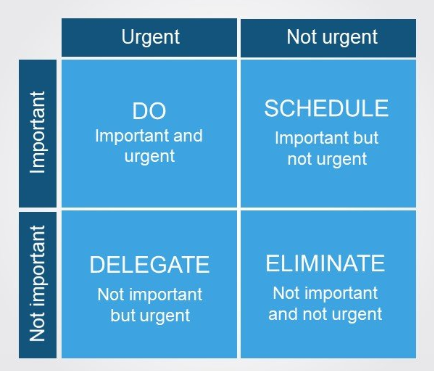
The Eisenhower Matrix, often referred to as the Urgent-Important matrix, has four quadrants illustrating the relationship between the urgency and importance of tasks.
You can use the Eisenhower principle in the context of the hypothetical scenario we described above.
In that case, we can label the tasks due on Wednesday as “urgent” but “not important”. These tasks often reduce your productivity and distract you from focusing on urgent tasks. Hence, you should consider delegating these tasks.
We can label the tasks due Friday as “important” but “not urgent”, classifying them as part of the “schedule” quadrant.
The schedule quadrant corresponds to setting a date in the near future to complete the important tasks.
Is accountability clear?
Are you hearing this at work? That's busywork
Enter between 1 and 150,000
Enter between 0.5 and 40
Enter between $10 and $1,000
Based on $30/hr x 4 hrs/wk
Your loss and waste is:
every week
What you are losing
Cash burned on busywork
per week in wasted wages
What you could have gained
160 extra hours could create:
per week in real and compounding value
Total cumulative impact over time (real cost + missed opportunities)
You are bleeding cash, annoying every employee and killing dreams.
It's a no-brainer
Why accountability is a two-way street
One of the key components of task management, apart from the urgency-importance principle described above, is coordination with your teammates.
Teamwork is one of the pillars of success in not forgetting tasks and punctually managing them.
A task, unless super easy, usually requires you to distribute certain subtasks. This could be an employee onboarding task managed by the HR person, a business analysis executed by an analyst, or a technical matter handled by an IT person.
These commonplace tasks usually require back and forth feedback from team members. At Tallyfy, we’ve seen that teams who automate these handoffs spend far less time chasing updates and more time doing meaningful work.
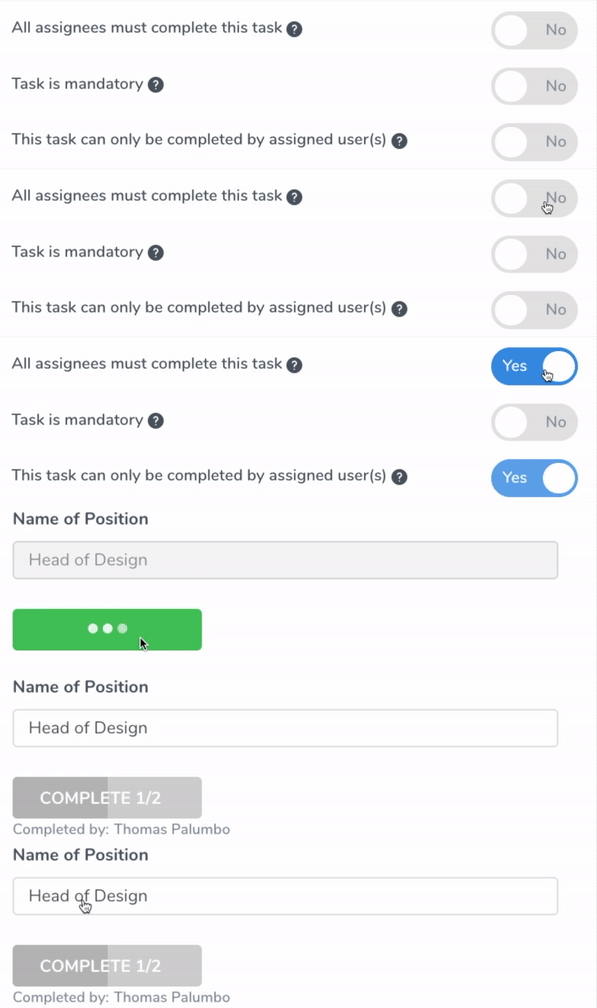
You might have trouble doing this via email, but in the GIF above you can see an example of how easy this process can be.
In the GIF, we can see that Jane is assigning Thomas, head of design, and Jill, head of operations, and she can track their progress without needing to remember it.
That way - Jane can assign hundreds of tasks and never need to worry about tracking them.
The user selects assignees and determines whether the task is mandatory and whether it is unique to those assignees.
After the user completes the logistics, the assignees will be notified via an email sent by the system.
The first notification step is often forgotten in tasks that require collaboration by a large pool of people.
Task management tools assist you through processes like these, ensuring you and your team members get notified automatically. For more on assigning team members and efficiently keep track of progress, check here.
Creating rules to expedite tasks
Client onboarding, similar to employee onboarding, is an indispensable aspect of many businesses.
A client onboarding task requires the core elements listed above such as the prioritization of important tasks and effective collaboration between teams.
However, there is an additional key element to such processes. During a client onboarding task, there are several important specifications such as the size of the client company and its size-dependent factors.
What are these factors?
Automating rules to skip tasks
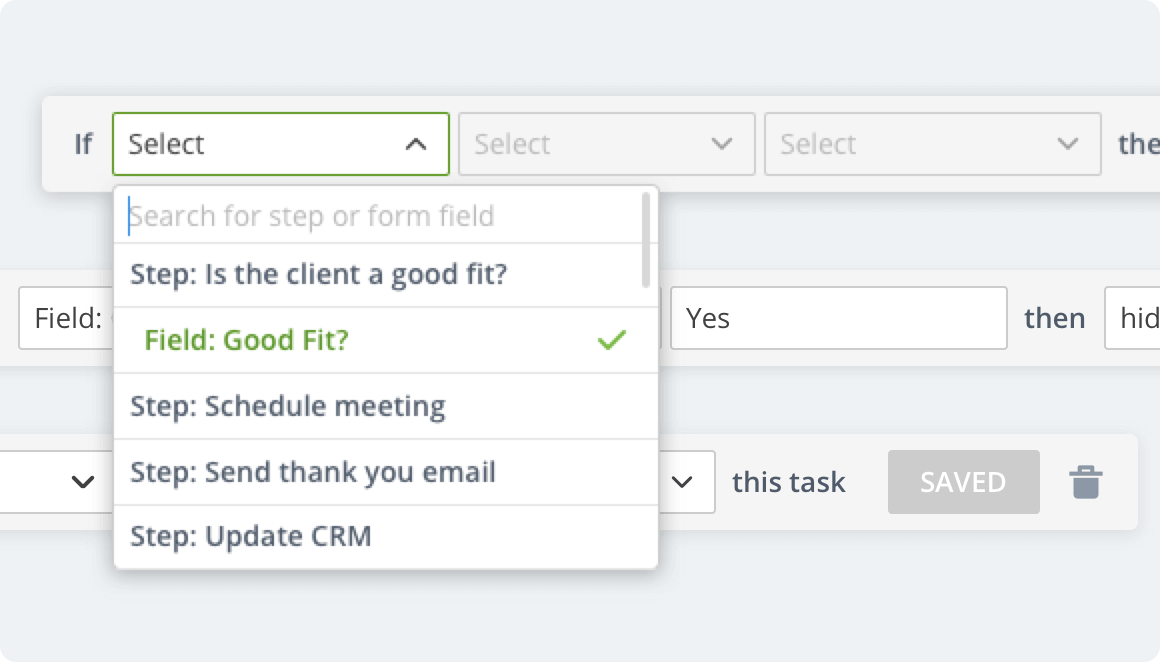
Here, we see an example of the rules method.
Let us assume you own a SaaS company that offers different plans for your software services.
Your prices, plans, and campaigns may fluctuate depending on factors such as the team size of your client. Let us also assume that you have different logistical processes such as legal ones that are dependent on these factors.
This makes dealing with the onboarding process more intricate, and the likelihood of forgetting certain subtasks probably even higher.
The rules method streamlines the client onboarding process by enabling the user to create conditional rules without writing any code.
To give a more concrete example, we can go back to that SaaS example.
Depending on the size of the team you are onboarding, you would direct them to complete different subtasks. Based on hundreds of implementations we have supported, this conditional routing is essential for efficiency. One healthcare team managing 51-200 employees told us their biggest pain point was approval bottlenecks delaying patient care - cross-department workflows between clinical, administrative, and billing teams needed clear accountability at each handoff point. If your client’s company size is greater than 100, they will be directed to x plan. If they are less than 100, they will be directed to y plan.
Using rules, assignees are notified instantaneously and client-engagement procedures are expedited. This maintains solid accountability in the workplace.
For more on setting up and using the Rules method on Tallyfy, check here.

Shown above is another example of creating rules.
This time, we examine an employee onboarding example.
We can see that HR is setting up a rule about the Immigration Status of the employee. The legal team would get different notifications based on the Immigration status of the candidate.
With a sound and legal onboarding procedure, accountability in the workplace is promoted.
Reporting issues
Reporting issues in tasks is a key element for any business.
It decreases the probability of making subsequent errors and also of forgetting tasks.
While working on a task, it is inevitable to come across certain issues. In most cases, these issues can be solved relatively easily and promptly.
However, there are also instances in which you have to consult other members in your team or cross-collaborate with other teams in your company.
In order to improve accountability in the workplace, you should not delay handling issues and act swiftly.
Because when issues start to accumulate, the likelihood that you forget that task increases substantially.
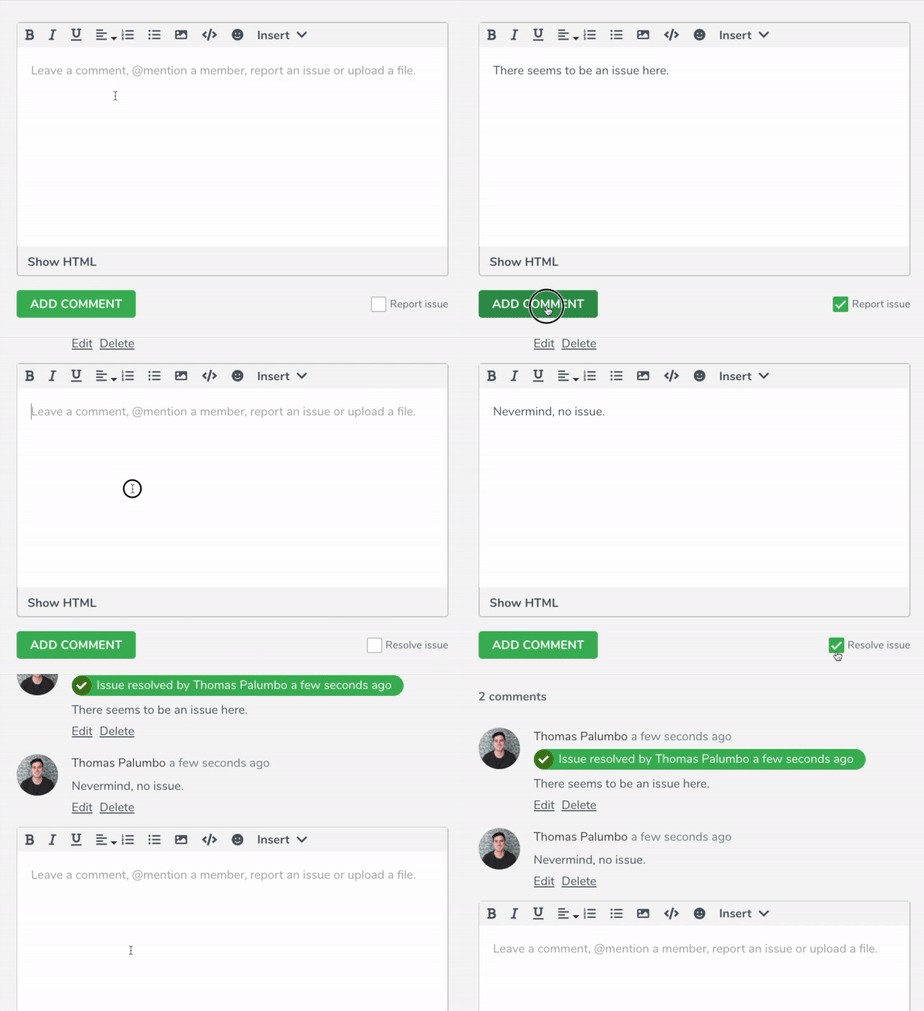
This issue reporting functionality depicted in the GIF above allows the user to describe the issue by leaving a short comment and uploading auxiliary images.
This tool especially comes in handy in cases where you need to collaborate with different departments within your company.
Your team members get notified instantaneously and can solve the issue. The issuer can also resolve the issue themselves in case they realize there is no need for further assistance.
This systematic approach to reporting issues eases many processes and again promotes accountability in the workplace.
Tracking task progress
Keeping track of task progress is integral to any business.
Without proper progress tracking, it is very difficult to maintain accountability in the workplace.
In most cases, your progress is dependent on that of your coworkers, and vice versa. This makes accountability a two-way street.
So it’s key to have solid communication between teams, and a strategic approach to keeping track of each others’ progress.
The rudimentary methods of keeping track of task progress typically include taking notes either physically or virtually, or setting reminder and alerts. However, there is a lot of room for error in these methods.
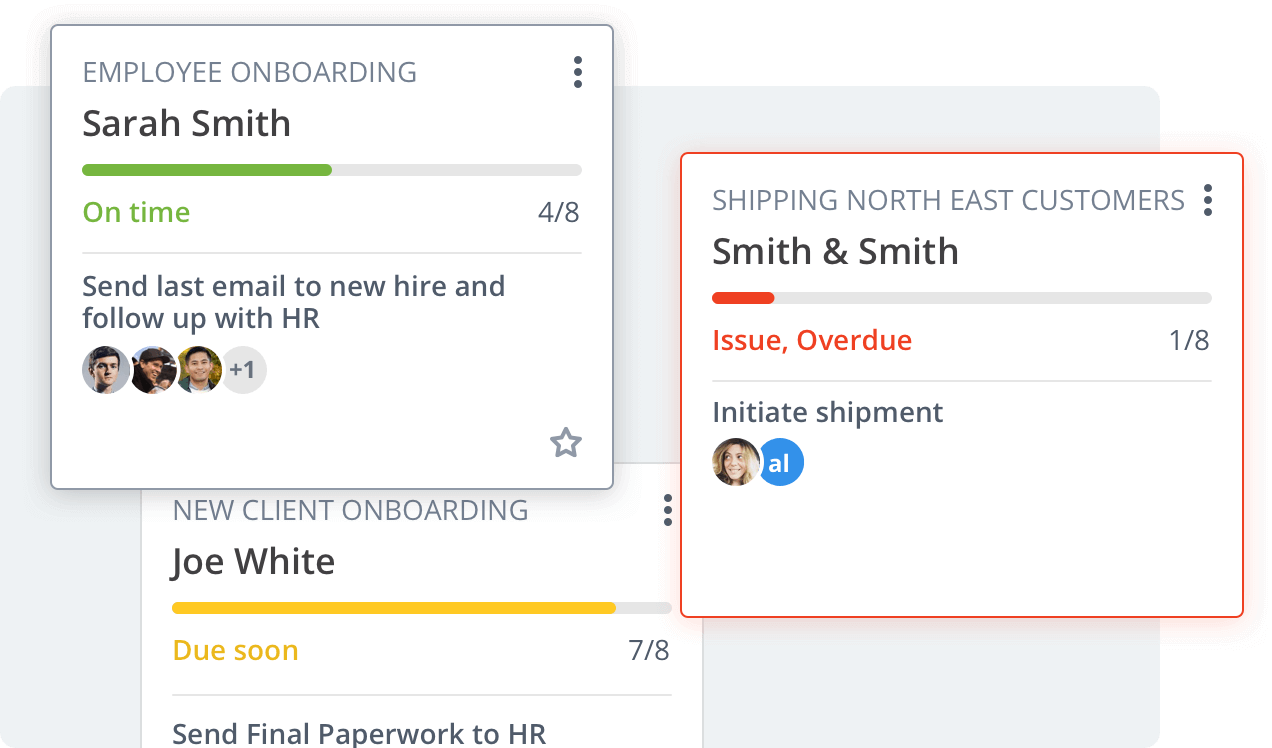
Here, we can see a process tracking interface.
The UI is very effective since it provides a horizontal legend that indicates the progress in that task. Assume having three basic steps in one task: gathering info, sending client an update, and finalizing details.
If two team members are assigned to complete each task, each person would contribute roughly 16% to the horizontal progress bar. Having more tasks would lead to having more assignees, and therefore smaller contributions from each member.
This would make the tracking progress harder, increasing the probability of forgetting the overall task.
Conclusion
In this article, we examined the key principles of successfully managing tasks.
Overall, we concluded that syncing between team members, prioritization of important tasks, and constant feedback between divisions are essential for a successful task management.
We highlighted that effective task management promotes accountability in the workplace, and that businesses should adapt this as a culture.
About the Author
Amit is the CEO of Tallyfy. He is a workflow expert and specializes in process automation and the next generation of business process management in the post-flowchart age. He has decades of consulting experience in task and workflow automation, continuous improvement (all the flavors) and AI-driven workflows for small and large companies. Amit did a Computer Science degree at the University of Bath and moved from the UK to St. Louis, MO in 2014. He loves watching American robins and their nesting behaviors!
Follow Amit on his website, LinkedIn, Facebook, Reddit, X (Twitter) or YouTube.
Automate your workflows with Tallyfy
Stop chasing status updates. Track and automate your processes in one place.